6.6. Crossfilter
Crossfilter is a feature of DAX when it filters the underlying dataset even though there aren’t any visual filters present.
Introduction
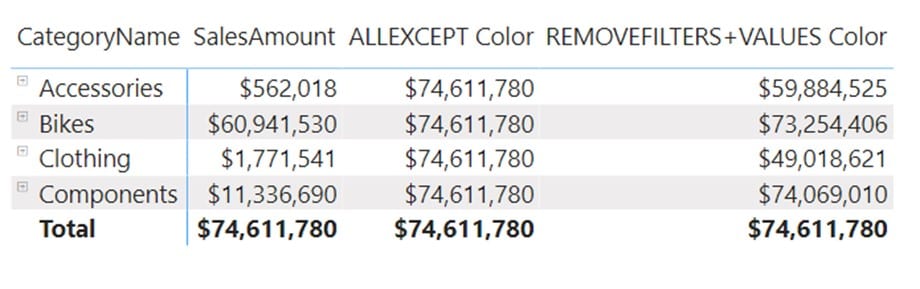
In this example, we will explain a very important feature of CALCULATE filter arguments. We will also explain why you should always prefer the combination of ALL/REMOVEFILTER + VALUES instead of ALLEXCEPT function. We will use the following 2 measures and observe their results.
ALLEXCEPT_Color = CALCULATE([SalesAmount],ALLEXCEPT(DimProduct,DimProduct[Color]))
REMOVEFILTERS_VALUES_Color = CALCULATE([SalesAmount],REMOVEFILTERS(DimProduct),VALUES(DimProduct[Color]))
If we observe the calculation, we might assume that they both should return the same values. But we can see that they return different figures in the visual. Let’s focus on the Accessories row and see what each of these functions returns.
ALLEXCEPT Color: prior to calculation, this function removes all filters from the DimProduct table, except the one coming from the column DimProduct[Color].
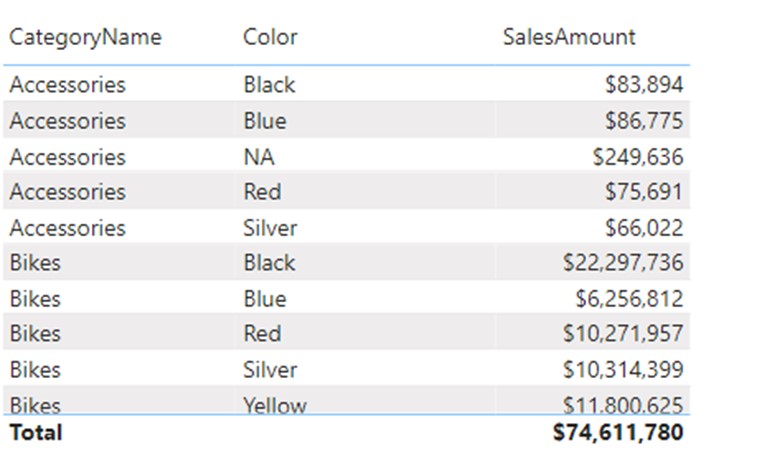
REMOVEFILTERS+VALUES Color: This calculation does almost the same thing as the ALLEXCEPT version, but with one big difference. With the use of VALUES function, it activates the crossfilter feature of DAX. What is the crossfilter feature? The table below shows all colors being sold with the Accessories CategoryName. We can clearly see that there are only 5 colors present, while other colors (like the color Yellow in the Bikes segment) are not present.
Order of Evaluation
The calculation ignores all columns coming from the DimProduct table, but then reapply values that are valid for the DimProduct[Color] column. In doing so, it also crossfilters the DimProduct table. If we focus on the Accessories cell in the first picture, the crossfilter does the following:
- Before the calculation starts, the filter arguments of the CALCULATE are put in AND condition.
- The first filter argument ignores all columns from DimProduct table, including the CategoryName one.
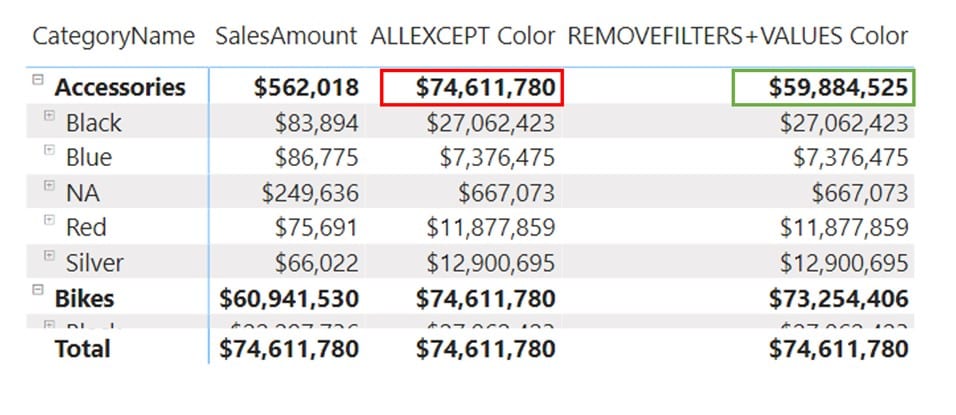
- The second argument reinstalls the filter on the color column, which crossfilters the CategoryName. Even though the Color column is not in the visual, the crossfilter effect is visible because the value of 59 mil. is the sales amount of the Black, Blue, NA, Red, and Silver colors combined. Those are the colors with sales in the Accessories category. Sales amounts of other colors (Yellow, Grey, etc.) are ignored since there aren’t any sales of Accessories in those colors.
- The SalesAmount is calculated in the new context which, for accessories, consists of Black, Blue, NA, Red, and Silver colors.
If we expand the visual to a color granularity, then on the Color level both calculations return the same numbers, but on the top CategoryName level, the ALLEXCEPT returns an incorrect sum of the Color values.
In most calculations you would want to use the combination of REMOVEFILTERS+VALUES since it is more predictable and easier to use/understand. ALLEXCEPT is used in more advanced coding and only in specific situations.
Comments
Leave a comment
0