6.4. CALCULATE order of evaluation
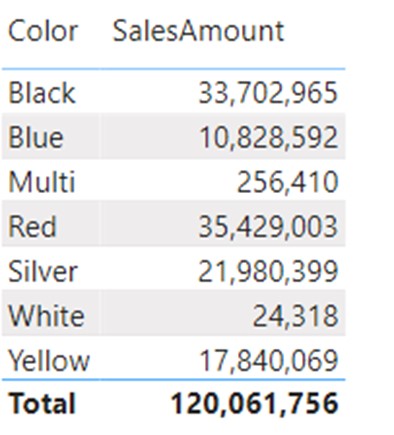
Explanation
CALCULATE has an evaluation order different from most other DAX calculations. We can say that it works from outer to inner CALCULATE statements. Let’s explain this with an example:
SalesMultipleCalculate =
CALCULATE(
    CALCULATE(
        [SalesAmount],
        Sales[Color] = "Black"
    ),
    Sales[Color] = "Blue"
)
Which value would the SalesMultipleCalculate measure return? a) Blank value b) 33,702,965 (Black) c) 10,828,592 (Blue)
The correct answer is B. Following is the explanation and order of evaluation.
SalesMultipleCalculate =
CALCULATE(
    CALCULATE( [SalesAmount], Sales[Color] = "Black" ),
    Sales[Color] = "Blue"
)
- We start with an outer CALCULATE (2nd line). Before evaluating the required argument (3rd line of the measure), the optional filter argument of an outer CALCULATE sets the color to “blue”.
- After the outer CALCULATE performs its filter modification, the required argument starts to evaluate (3rd line). This argument also has CALCULATE, meaning the inner CALCULATE also waits for its required [SalesAmount] argument to evaluate, but only after the filter argument does its filter modification. This time the modification of the filter argument sets the color to “black”, and the required argument [SalesAmount] is being calculated in the final filter context which consists of black color.

Sugar Syntax with Boolean Expression
The result is obvious in the visual. Why the correct answer is not blank?
It is because of the overwrite feature of DAX CALCULATE arguments combined with the sugar syntax of the Boolean expression. When we remove the sugar syntax from the formula, the formula looks like this:
SalesMultipleCalculate =
CALCULATE(
    CALCULATE(
        [SalesAmount],
        FILTER(
            ALL( Sales[Color] ),
            Sales[Color] = "Black"
        )
    ),
    FILTER(
        ALL( Sales[Color] ),
        Sales[Color] = "Blue"
    )
)
The outer CALCULATE is overwriting the original filter coming from the visual and always sets the color to the value “Blue”. The inner CALCULATE then overwrites the outer filter (which is now set to blue), and sets its value to be always “Black”. That way, no matter which color filters the visual, the calculation will always return the [SalesAmount] of the black color.
CALCULATE final evaluation order
CALCULATE is a very versatile function and can impact any part of the calculation. To be able to use it correctly, you need to understand its execution order. Below you can find a summary of execution steps for every DAX calculation:
- Original filter context Filters coming from visual and other cross-filtered visuals will form an original filter context.
- Model Modifiers CROSSFILTER or USERELATIONSHIP functions used as CALCULATE filter arguments can change the filter propagation and direction throughout the data model.
- Row 2 filter context transformation arguments If CALCULATE is used inside of a row context, it will transform all values from columns used in the row context into filter arguments and they will be applied to a modified filter context. If there is no row context, this step is skipped.
- CALCULATE Filter/Remove arguments (for more info on these types of arguments check this article) Only after filters coming from row2filter transformation are applied to the filter context, do the CALCULATE arguments start to further modify the context. It is extremely important to understand that these arguments come after transformation and that they can override filters applied through the row2filter transition. All CALCULATE filter arguments are put in AND condition.
- Expression Once all CALCULATE arguments are applied, the expression is evaluated in the newly created filter context.
To explain the order of evaluation even further, let’s check the following measure and its implications on the result.
TopQTY_Measure =
MAXX(
    VALUES( FactSales[SalesOrderNumber] ),
    CALCULATE(
        [TotalQTY],
        ALL( FactSales[SalesOrderNumber] )
    )
)

We will again focus on the “Albany” city. These are the steps in which the calculation is performed:
- Original Filter context = DimCustomer[City]=”Albany” Calculation starts and MAXX creates a virtual table of SalesOrders to iterate upon. For each row of the SalesOrder iteration the following calculation applies: CALCULATE( [TotalQTY], ALL( FactSales[SalesOrderNumber] ) )
- Since used in the row context of the MAXX iteration, CALCULATE will first transform all row contexts to filters and they will merge with the original filter context.
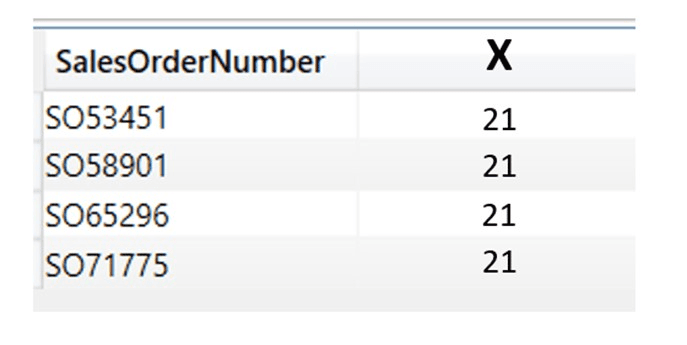
- Only after row2filter transformation has been applied, CALCULATE filters apply. That’s why the result is giving a wrong figure of 21 (which is the total sum of qty for all Albany SalesOrders). For the first iteration of Albany Sales order the CALCULATE transformed the row value of SO53451 to a filter, but after that CALCULATE argument kicked in and overwrote that filter with filter remover ALL(FactSales[SalesOrderNumber]) ignoring it altogether.
The nested iteration of the MAXX is shown in the picture below. This example is explained in more detail in the Row2Filter Context transition article.
*DAX is much smarter than that, and in this case it will not even perform context transition, but we found this method of explaining to be the most understandable.
Hi, after playing with some Power BI reports I realized I cannot continue and have reliable reports without making some steps back and start studying the DAX. I was reaching your site because I really like the way you explain different concepts and because I wanted an alternative source of information for "The definitive guide to DAX", a book I am reading right now. And I am struggling to digest the Calculate rules. You say here that Model modifiers come first, before context transition (row 2 filter). In the book I mentioned above, it is clear stated that context transition occur before model modifiers evaluation "Calculate modifiers are applied after the context transition, so they alter the effect of the context transition". I am a bit confused and I will be grateful if you could explain this difference.
Hi Costel, I believe there is a misunderstanding of Russo/Alberto sentence, or a bit of clumsy wording. Check the image attached. if I use measure : ContextTransition = SUMX(VALUES(Dim[Date]),CALCULATE(SUM(Data[Value]),USERELATIONSHIP(Dim[Date],Data[Date2]))) if the context transition was to be used before modifier (userelationship), than you would expect under filter context dimdate[date]=1/1/2025 number 1 or blank as a result of the measure. but you will get number 2 under the same condition. which means that first modifier applied inactive relationship, then later context transition moved across that relationship.